Midjourney
Generative image tool with a clean web interface and sharp output. Built for designers who want fast results with control over style.
Pros
- Browser interface makes it easier to use
- Consistently high-quality image output
Cons
- No free version available
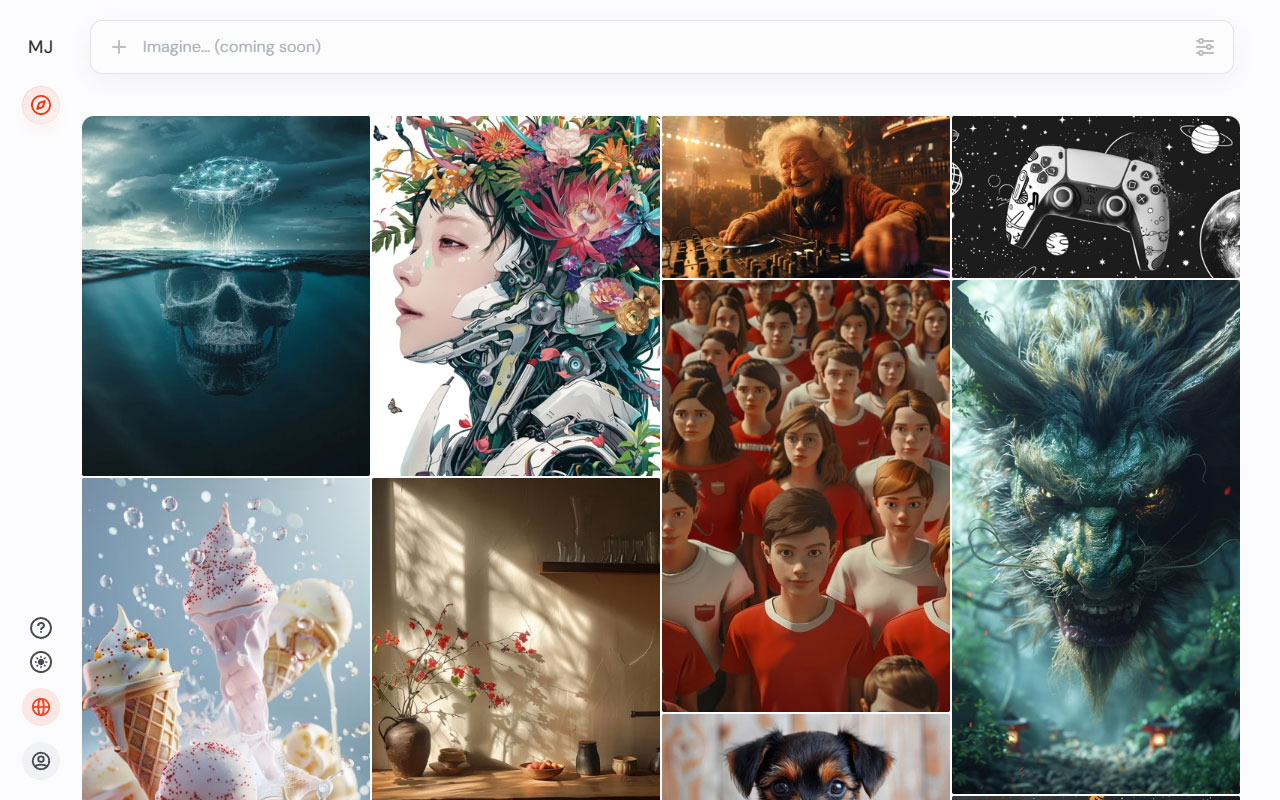
Midjourney is a text-to-image AI tool that now works both in Discord and in the browser. The web interface is a big improvement, making it easier to generate, manage, and organize images without dealing with cluttered chat threads. It still uses the same prompt-first approach, but now feels more like a proper design tool and less like a bot buried in a server.
The output quality continues to improve fast. Each new version brings better lighting, realism, and control. With the right prompt, the results are sharp enough for client work, concept art, or even polished production elements. But Midjourney isn’t a mind reader. If you want usable images, you need to be specific. Using another AI tool to help shape prompts can save time and get you better results.
There’s no free tier anymore. It used to offer limited trials, which made it easier to test the tool without committing. Now it’s subscription-only. That adds a bit of friction, but for designers who need high-quality visual output on demand, it still earns its spot in the workflow. Midjourney moves fast, generates fast, and gets better every month. It’s not perfect, but it’s definitely useful.


More
AI Photo Tools
Lummi
AI-first image library and editor that mixes curated stock, generator tools, upscaling, and quick edits so you can get production-ready visuals.
Pixelcut
AI photo studio for product and social shots: clean background removal, image upscaler, template scenes, batch edits and high res exports.
Nano Banana
AI image editing and generation model. Accepts natural language prompts, keeps characters consistent, delivers photo real results, and integrates with Gemini.
ChatGPT
Studio minded conversational AI that sparks directions, polishes tone, and generates on brand copy and imagery via DALL·E, Sora, plugins and shared workspaces.
Topaz Labs
A suite of AI software designed to upscale, sharpen and clean up photo and video files.


Get a grip on your design
resources and join our community
Free Membership
Current Membership
Save your favorite resources to your personal board for quick access and easy referencing.
- Create 1 board
- Save 10 resources
- Share your saved board with your team and network
- Rate and suggest resources
- Access to curated boards
- Be the first to discover new tools, trends, and insider perspectives
Premium Membership
Save your favorite resources to your personal board for quick access and easy referencing
- Create 50 boards
- Save 50 resources per board
- Share your saved board with your team and network
- Rate and suggest resources
- Access to curated boards
- Be the first to discover new tools, trends, and insider perspectives

Save this resource to a board.
Before saving a resource a board needs to be created.
Save to favorites.
Add to my list.
Name your new board:
Edit Board
Share or Delete Board
Are you sure you want to delete this Board?
Delete from my favorites.Are you sure you want to delete this Resource?
Remove from this board.Suggest a resource, report a broken or expired link.
Send We See Giants a message.
Free Membership
Current Membership
Save your favorite resources to your personal board for quick access and easy referencing.
- Create 1 board
- Save 10 resources
- Share your saved board with your team and network
- Rate and suggest resources
- Access to curated boards
- Be the first to discover new tools, trends, and insider perspectives
Already have an account? LOGIN